> ## Documentation Index
> Fetch the complete documentation index at: https://mcpjam-docs-coming-from-mcp-inspector.mintlify.site/llms.txt
> Use this file to discover all available pages before exploring further.
# Save Results to MCPJam
> Save eval results to the MCPJam dashboard with an MCPJam API key (sk_…) for tracking and CI visibility
Reporting authenticates with **MCPJam API keys (`sk_…`)** from Settings → API keys. The legacy project API keys (`mcpjam_…`) are retired and no longer work anywhere — see [API keys](/reference/api-keys).
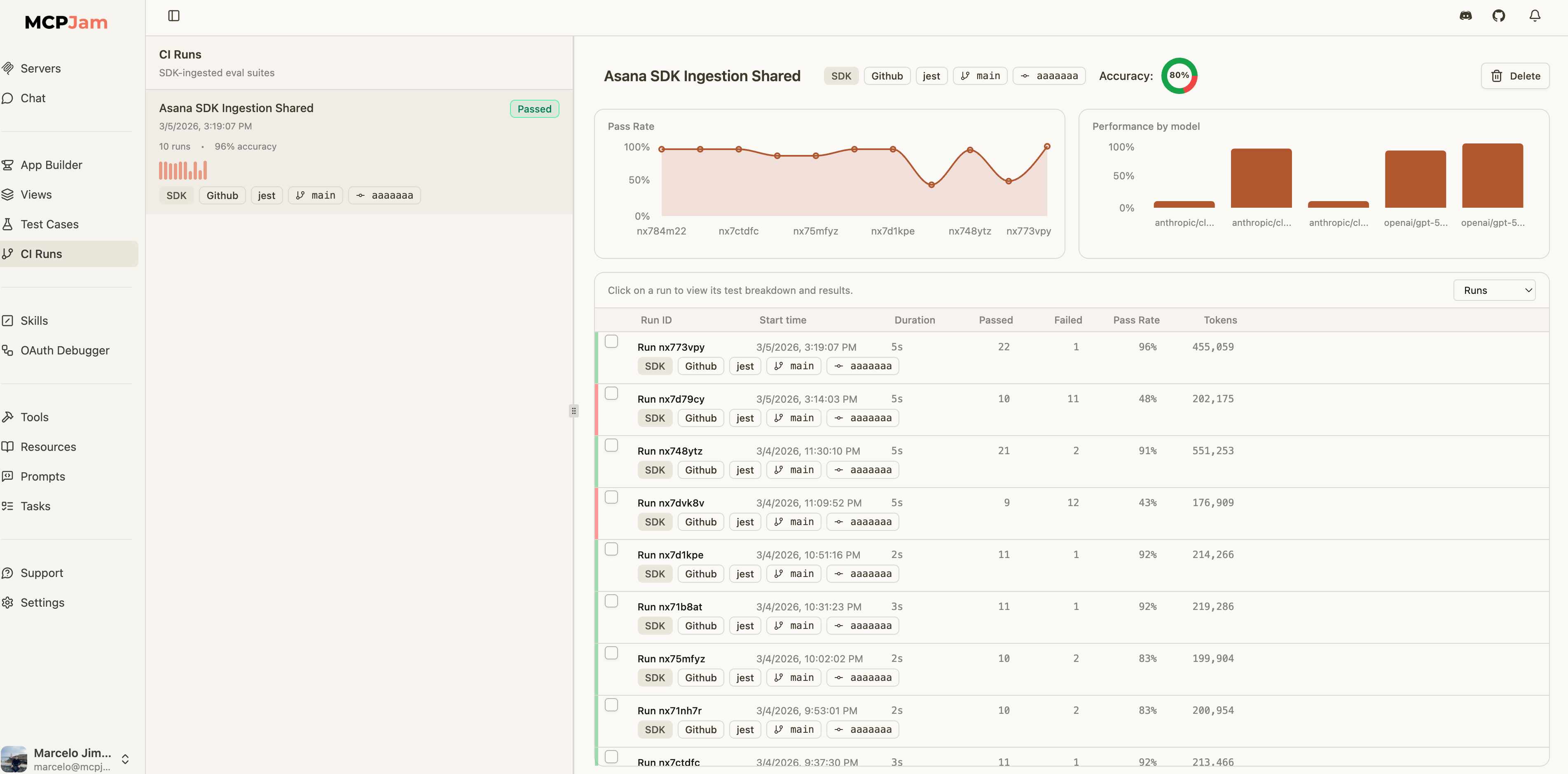
After running evals, you can save results to MCPJam to track accuracy over time, compare across branches, and get visibility in the CI Evals dashboard.
 ## Setup
Create an MCPJam API key (`sk_…`) under **Settings → API keys** and export it:
```bash theme={null}
export MCPJAM_API_KEY=sk_...
# Optional: file results under a specific project (defaults to your org's Default project).
export MCPJAM_PROJECT_ID=
```
That's it — both `EvalTest` and `EvalSuite` auto-save results when this key is available. Results land in the project named by `MCPJAM_PROJECT_ID` (or the `project` option in the `mcpjam:` config), falling back to your organization's **Default** project.
**Attach the connected `MCPClientManager` to [`HostRunner`](/sdk/reference/host-runner)** (or pass `agent` / `mcpClientManager` to manual reporting APIs) when you need either of the following:
1. **MCP App / widget replay in Evals traces** — After each MCP App tool call, the agent uses the manager’s [`readResource`](/sdk/reference/mcp-client-manager#readresource) to fetch HTML from the tool’s `ui.resourceUri` and fills [`widgetSnapshots`](/sdk/reference/prompt-result#mcp-app-widget-snapshots) on [`PromptResult`](/sdk/reference/prompt-result). Without the manager, traces still upload (messages + spans) but **widgets will not replay** in the dashboard. The tool’s JSON result alone is not enough for offline iframe replay.
2. **Replay credentials (authenticated HTTP MCP)** — The SDK can persist server connection details for debugging and reruns. You do not need to build a second secret object yourself; replay config is derived automatically when the agent or manager is attached.
## Auto-Save from EvalTest
When `MCPJAM_API_KEY` is set, `EvalTest.run()` automatically saves results:
```typescript theme={null}
await test.run(agent, {
iterations: 30,
mcpjam: {
suiteName: "Addition Eval",
passCriteria: { minimumPassRate: 90 },
},
});
```
**Tool execution:** Auto-saved payloads use the same **pass/fail rules** as the [eval reporting reference](/sdk/reference/eval-reporting#tool-execution-and-passed): failed tool calls default to `passed: false` unless you set `failOnToolError: false` on the `mcpjam` object.
For authenticated HTTP servers:
```typescript theme={null}
import { MCPClientManager, HostRunner } from "@mcpjam/sdk";
const manager = new MCPClientManager({
asana: {
url: process.env.MCP_SERVER_URL!,
refreshToken: process.env.MCP_REFRESH_TOKEN!,
clientId: process.env.MCP_CLIENT_ID!,
clientSecret: process.env.MCP_CLIENT_SECRET,
},
});
await manager.connectToServer("asana");
const agent = new HostRunner({
tools: await manager.getTools(),
model: "openai/gpt-4o-mini",
apiKey: process.env.OPENAI_API_KEY!,
mcpClientManager: manager,
});
await test.run(agent, {
iterations: 30,
mcpjam: { suiteName: "Asana Eval" },
});
```
To disable auto-save for a specific run:
```typescript theme={null}
await test.run(agent, {
iterations: 30,
mcpjam: { enabled: false },
});
```
## Auto-Save from EvalSuite
Suites can be configured at construction or run time:
```typescript theme={null}
const suite = new EvalSuite({
name: "Math Operations",
mcpjam: {
suiteName: "Math Eval",
ci: {
branch: process.env.GITHUB_REF_NAME,
commitSha: process.env.GITHUB_SHA,
runUrl: `${process.env.GITHUB_SERVER_URL}/${process.env.GITHUB_REPOSITORY}/actions/runs/${process.env.GITHUB_RUN_ID}`,
},
},
});
```
When a suite runs, individual `EvalTest` auto-saves are suppressed to avoid duplicate uploads. The suite consolidates all test results into a single run.
## Manual Save APIs
For more control — custom test runners, CI post-steps, or framework-agnostic flows — the SDK provides dedicated APIs:
```typescript theme={null}
import {
reportEvalResults,
reportEvalResultsSafely,
createEvalRunReporter,
uploadEvalArtifact,
} from "@mcpjam/sdk";
// 1) One-shot save (strict — throws on failure)
await reportEvalResults({
suiteName: "Nightly",
mcpClientManager: manager,
results: [{ caseTitle: "healthcheck", passed: true }],
});
// 2) One-shot save (safe — returns null on failure)
const result = await reportEvalResultsSafely({
suiteName: "Nightly",
results: [{ caseTitle: "healthcheck", passed: true }],
});
// 3) Incremental reporter (long-running processes)
// Assumes `agent` was created with `mcpClientManager: manager`
const reporter = createEvalRunReporter({
suiteName: "Incremental",
agent,
});
await reporter.record({ caseTitle: "step-1", passed: true });
await reporter.record({ caseTitle: "step-2", passed: false, error: "timeout" });
const output = await reporter.finalize();
// 4) Artifact upload (JUnit XML, Jest JSON, Vitest JSON)
await uploadEvalArtifact({
suiteName: "JUnit import",
format: "junit-xml",
artifact: junitXmlString,
});
```
`reportEvalResults()` and `createEvalRunReporter()` resolve replay credentials in this order:
1. `serverReplayConfigs` if you pass it explicitly
2. `agent.getServerReplayConfigs()`
3. `mcpClientManager.getServerReplayConfigs()`
Most users should pass `agent` or `mcpClientManager` and let the SDK derive replay credentials automatically. Use `serverReplayConfigs` only as an advanced override.
When replay configs are inferred from `agent` or `mcpClientManager`, the SDK limits them to the `serverNames` you attach to the run when `serverNames` is provided.
**Manual reporters (Vitest/Jest hooks):** Pass `agent` or `mcpClientManager` into [`createEvalRunReporter`](/sdk/reference/eval-reporting#createevalrunreporter) — not only on `HostRunner` — and call **`await reporter.finalize()` before `await manager.disconnectAllServers()`** so replay config is still available at upload time. See [Replay metadata for the MCPJam UI](/sdk/reference/eval-reporting#replay-metadata-for-the-mcpjam-ui).
## CI Metadata
Attach CI/CD context to your eval runs for traceability in the dashboard:
```typescript theme={null}
await reportEvalResults({
suiteName: "Nightly",
results: [...],
ci: {
provider: "github",
branch: process.env.GITHUB_REF_NAME,
commitSha: process.env.GITHUB_SHA,
runUrl: `${process.env.GITHUB_SERVER_URL}/${process.env.GITHUB_REPOSITORY}/actions/runs/${process.env.GITHUB_RUN_ID}`,
pipelineId: process.env.GITHUB_WORKFLOW,
jobId: process.env.GITHUB_JOB,
},
});
```
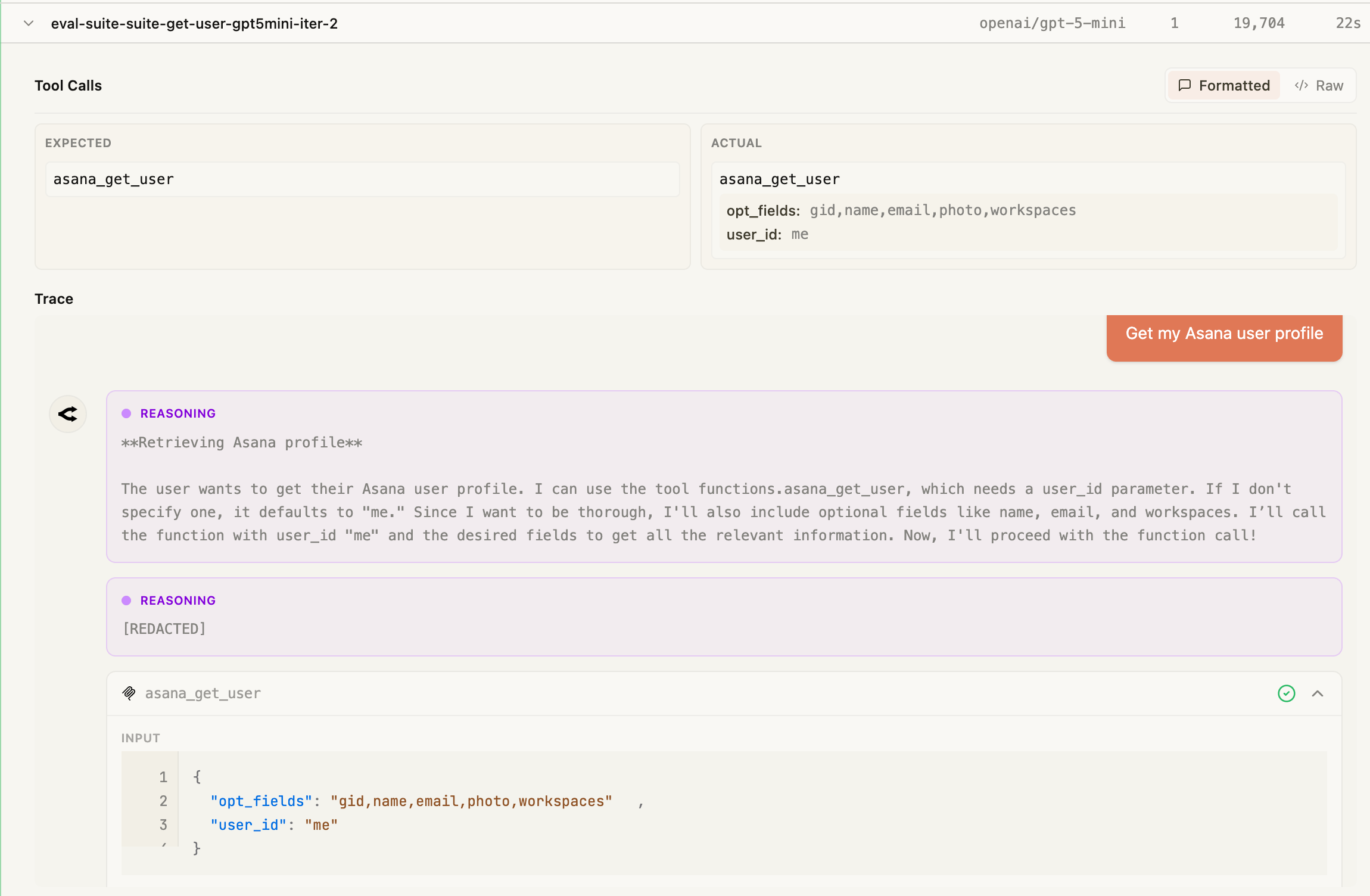
Each iteration records the expected and actual tool calls side by side, along with the model's reasoning trace, so you can pinpoint exactly why a test passed or failed:
## Setup
Create an MCPJam API key (`sk_…`) under **Settings → API keys** and export it:
```bash theme={null}
export MCPJAM_API_KEY=sk_...
# Optional: file results under a specific project (defaults to your org's Default project).
export MCPJAM_PROJECT_ID=
```
That's it — both `EvalTest` and `EvalSuite` auto-save results when this key is available. Results land in the project named by `MCPJAM_PROJECT_ID` (or the `project` option in the `mcpjam:` config), falling back to your organization's **Default** project.
**Attach the connected `MCPClientManager` to [`HostRunner`](/sdk/reference/host-runner)** (or pass `agent` / `mcpClientManager` to manual reporting APIs) when you need either of the following:
1. **MCP App / widget replay in Evals traces** — After each MCP App tool call, the agent uses the manager’s [`readResource`](/sdk/reference/mcp-client-manager#readresource) to fetch HTML from the tool’s `ui.resourceUri` and fills [`widgetSnapshots`](/sdk/reference/prompt-result#mcp-app-widget-snapshots) on [`PromptResult`](/sdk/reference/prompt-result). Without the manager, traces still upload (messages + spans) but **widgets will not replay** in the dashboard. The tool’s JSON result alone is not enough for offline iframe replay.
2. **Replay credentials (authenticated HTTP MCP)** — The SDK can persist server connection details for debugging and reruns. You do not need to build a second secret object yourself; replay config is derived automatically when the agent or manager is attached.
## Auto-Save from EvalTest
When `MCPJAM_API_KEY` is set, `EvalTest.run()` automatically saves results:
```typescript theme={null}
await test.run(agent, {
iterations: 30,
mcpjam: {
suiteName: "Addition Eval",
passCriteria: { minimumPassRate: 90 },
},
});
```
**Tool execution:** Auto-saved payloads use the same **pass/fail rules** as the [eval reporting reference](/sdk/reference/eval-reporting#tool-execution-and-passed): failed tool calls default to `passed: false` unless you set `failOnToolError: false` on the `mcpjam` object.
For authenticated HTTP servers:
```typescript theme={null}
import { MCPClientManager, HostRunner } from "@mcpjam/sdk";
const manager = new MCPClientManager({
asana: {
url: process.env.MCP_SERVER_URL!,
refreshToken: process.env.MCP_REFRESH_TOKEN!,
clientId: process.env.MCP_CLIENT_ID!,
clientSecret: process.env.MCP_CLIENT_SECRET,
},
});
await manager.connectToServer("asana");
const agent = new HostRunner({
tools: await manager.getTools(),
model: "openai/gpt-4o-mini",
apiKey: process.env.OPENAI_API_KEY!,
mcpClientManager: manager,
});
await test.run(agent, {
iterations: 30,
mcpjam: { suiteName: "Asana Eval" },
});
```
To disable auto-save for a specific run:
```typescript theme={null}
await test.run(agent, {
iterations: 30,
mcpjam: { enabled: false },
});
```
## Auto-Save from EvalSuite
Suites can be configured at construction or run time:
```typescript theme={null}
const suite = new EvalSuite({
name: "Math Operations",
mcpjam: {
suiteName: "Math Eval",
ci: {
branch: process.env.GITHUB_REF_NAME,
commitSha: process.env.GITHUB_SHA,
runUrl: `${process.env.GITHUB_SERVER_URL}/${process.env.GITHUB_REPOSITORY}/actions/runs/${process.env.GITHUB_RUN_ID}`,
},
},
});
```
When a suite runs, individual `EvalTest` auto-saves are suppressed to avoid duplicate uploads. The suite consolidates all test results into a single run.
## Manual Save APIs
For more control — custom test runners, CI post-steps, or framework-agnostic flows — the SDK provides dedicated APIs:
```typescript theme={null}
import {
reportEvalResults,
reportEvalResultsSafely,
createEvalRunReporter,
uploadEvalArtifact,
} from "@mcpjam/sdk";
// 1) One-shot save (strict — throws on failure)
await reportEvalResults({
suiteName: "Nightly",
mcpClientManager: manager,
results: [{ caseTitle: "healthcheck", passed: true }],
});
// 2) One-shot save (safe — returns null on failure)
const result = await reportEvalResultsSafely({
suiteName: "Nightly",
results: [{ caseTitle: "healthcheck", passed: true }],
});
// 3) Incremental reporter (long-running processes)
// Assumes `agent` was created with `mcpClientManager: manager`
const reporter = createEvalRunReporter({
suiteName: "Incremental",
agent,
});
await reporter.record({ caseTitle: "step-1", passed: true });
await reporter.record({ caseTitle: "step-2", passed: false, error: "timeout" });
const output = await reporter.finalize();
// 4) Artifact upload (JUnit XML, Jest JSON, Vitest JSON)
await uploadEvalArtifact({
suiteName: "JUnit import",
format: "junit-xml",
artifact: junitXmlString,
});
```
`reportEvalResults()` and `createEvalRunReporter()` resolve replay credentials in this order:
1. `serverReplayConfigs` if you pass it explicitly
2. `agent.getServerReplayConfigs()`
3. `mcpClientManager.getServerReplayConfigs()`
Most users should pass `agent` or `mcpClientManager` and let the SDK derive replay credentials automatically. Use `serverReplayConfigs` only as an advanced override.
When replay configs are inferred from `agent` or `mcpClientManager`, the SDK limits them to the `serverNames` you attach to the run when `serverNames` is provided.
**Manual reporters (Vitest/Jest hooks):** Pass `agent` or `mcpClientManager` into [`createEvalRunReporter`](/sdk/reference/eval-reporting#createevalrunreporter) — not only on `HostRunner` — and call **`await reporter.finalize()` before `await manager.disconnectAllServers()`** so replay config is still available at upload time. See [Replay metadata for the MCPJam UI](/sdk/reference/eval-reporting#replay-metadata-for-the-mcpjam-ui).
## CI Metadata
Attach CI/CD context to your eval runs for traceability in the dashboard:
```typescript theme={null}
await reportEvalResults({
suiteName: "Nightly",
results: [...],
ci: {
provider: "github",
branch: process.env.GITHUB_REF_NAME,
commitSha: process.env.GITHUB_SHA,
runUrl: `${process.env.GITHUB_SERVER_URL}/${process.env.GITHUB_REPOSITORY}/actions/runs/${process.env.GITHUB_RUN_ID}`,
pipelineId: process.env.GITHUB_WORKFLOW,
jobId: process.env.GITHUB_JOB,
},
});
```
Each iteration records the expected and actual tool calls side by side, along with the model's reasoning trace, so you can pinpoint exactly why a test passed or failed:
 ## Next Steps
Learn about EvalTest, EvalSuite, and iteration strategies
Full API reference for all saving and reporting methods
## Next Steps
Learn about EvalTest, EvalSuite, and iteration strategies
Full API reference for all saving and reporting methods